


Many Australian businesses continue to rely on legacy applications to manage daily operations, customer data, financial transactions, and internal workflows. As these systems become more expensive to maintain and harder to integrate with modern technologies, many businesses are planning a cloud migration to improve security, scalability, operational performance, and long-term technology investments.
From healthcare providers meeting privacy obligations to retailers preparing for peak shopping periods and mining companies operating across remote locations, every cloud migration strategy must reflect industry requirements and business priorities. A successful migration is rarely just a technology upgrade. It also requires careful planning around compliance, system availability, and future business growth.
This cloud migration checklist outlines the planning steps Australian businesses should complete before moving legacy applications. Vrinsoft Pty Ltd is a trusted Cloud application migration services in Melbourne, Australia. With over a decade of experience, we created this checklist for business, to help them reduce risk and plan strategy that support long-term business goal.
It also highlights how migration priorities differ across industries, helping you reduce risk and build a migration strategy that supports long-term business goals.
Why Cloud Migration Strategies Differ Across Industries
Every business has different applications, compliance requirements, customer expectations, and operational risks. Moving an on-premises to cloud migration project forward without considering these factors often leads to unnecessary delays, higher costs, and avoidable risks.
Before planning an on premise to cloud migration, review the following:
- Identify business-critical applications that cannot experience extended downtime.
- Review application dependencies that connect multiple business systems.
- Check data security, compliance, and regulatory obligations before selecting a cloud platform.
- Assess whether existing infrastructure supports a phased migration to cloud approach or requires application modernization.
- Prioritise applications based on business value instead of migrating every system at the same time.
Completing this assessment creates a stronger foundation for an enterprise cloud migration strategy while reducing technical and operational risks later in the project.
Cloud Migration Checklist for Legacy Applications
Before investing in cloud application migration services, businesses should assess applications, business goals, security, and migration priorities. This checklist helps you plan a structured cloud migration while reducing risks, controlling costs, and supporting long-term business growth.
1. Audit Your Existing Applications
Every successful application migration to cloud project begins with a detailed assessment of your existing environment. Understanding how each application supports daily operations helps you prioritise workloads, estimate migration complexity, and identify systems that may require modernization before moving to the cloud. This assessment also creates the foundation for a realistic cloud migration plan.
Review the following:
- Business purpose of each application
- Current infrastructure
- Software dependencies
- Licensing requirements
- Performance issues
- Security risks
Once the assessment is complete, categorise applications based on business value and technical readiness. Some workloads can move immediately, while others may require upgrades, refactoring, or replacement. Completing this step reduces project risks and supports a more structured cloud migration process.
2. Define Business Goals
A cloud migration should support measurable business outcomes rather than simply relocating applications to a different infrastructure. Setting clear objectives allows stakeholders to prioritise investments, measure project success, and align technical decisions with long-term business plans.
Your objectives may include:
- Reducing infrastructure costs
- Improving application availability
- Supporting business growth
- Increasing security
- Simplifying maintenance
- Improving disaster recovery
These priorities influence every stage of the cloud migration strategy, from selecting the right cloud platform to deciding which applications should move first. Well-defined goals also make it easier to evaluate return on investment after the migration is complete.
3. Select the Right Cloud Migration Strategy
Choosing the right cloud migration strategy is one of the most important decisions during any modernization project. Every legacy application has different technical requirements, business priorities, and operational risks, so a single migration approach rarely works for every workload.
Selecting the right approach depends on your budget, business goals, application complexity, and long-term technology roadmap. A well-planned enterprise cloud migration strategy often combines multiple approaches across different applications instead of relying on a single migration method.
Some legacy systems may require custom software development instead of a direct migration, particularly when existing applications no longer support current business processes or future growth plans.
Common approaches include:
| Migration Strategy | Best Used When | Business Benefit |
|---|---|---|
| Rehost | The application works well and needs to move to the cloud quickly with minimal changes. | Faster migration, lower upfront costs, and reduced development effort. |
| Replatform | Minor improvements are needed to improve compatibility with cloud services without major redevelopment. | Better performance and scalability while keeping migration time manageable. |
| Refactor | The application requires architectural changes to support cloud-native capabilities such as microservices and containers. | Greater scalability, flexibility, and long-term performance. |
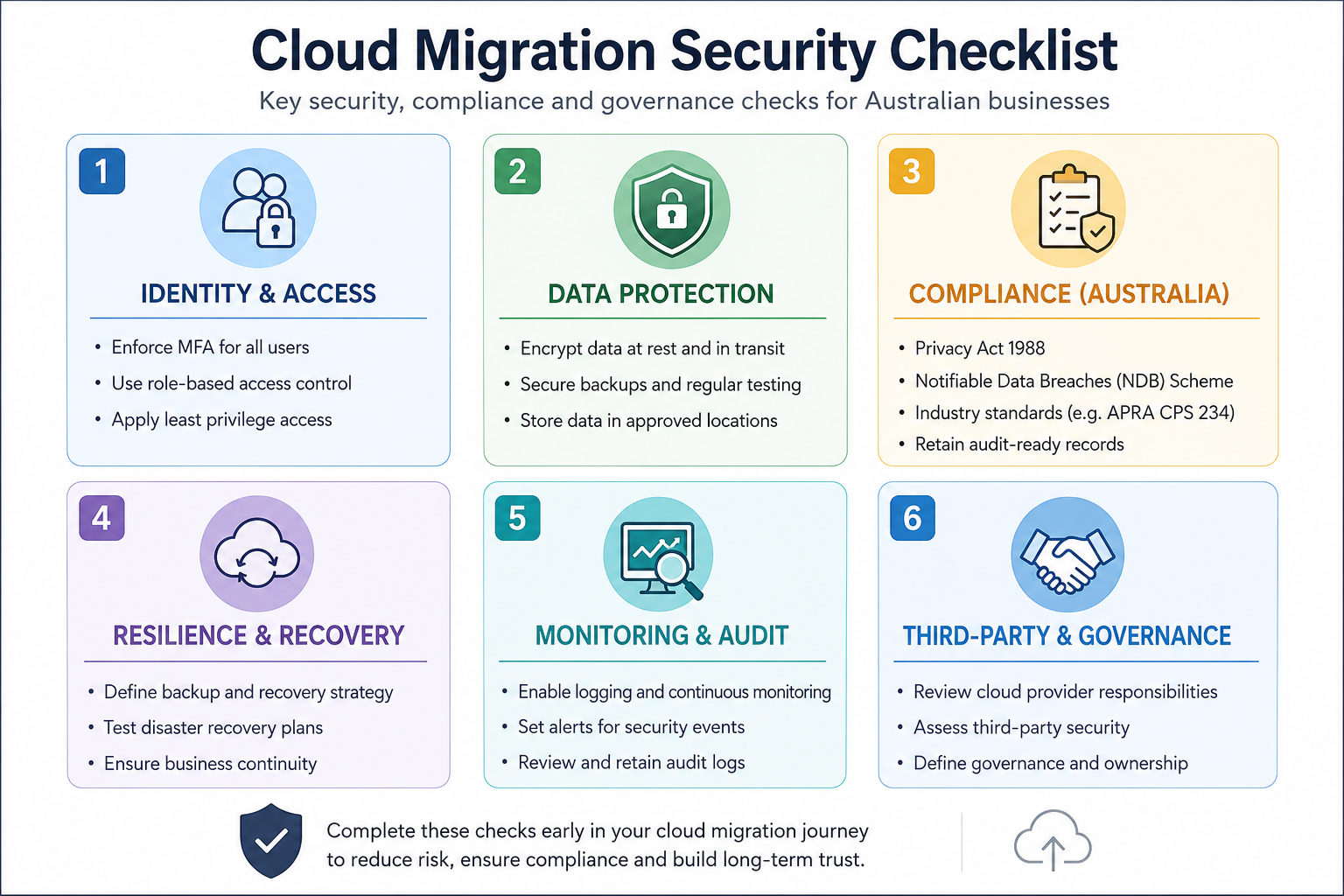
4. Review Security, Compliance and Data Governance
Security should be part of your cloud migration strategy from the planning stage, not after deployment. Before moving legacy applications, review the regulations, security controls, and governance requirements that apply to your business and industry.
Review the following:
- User access controls and MFA
- Data encryption
- Backup and disaster recovery
- Industry compliance requirements
- Audit logging and monitoring
- Data residency requirements
- Third-party vendor responsibilities
Strong governance reduces security risks, supports a successful cloud migration, and helps businesses meet Australian regulatory expectations throughout the migration process.
5. Map Application Dependencies
Legacy applications rarely operate in isolation. Most business systems exchange information with databases, third-party platforms, reporting tools, and authentication services. Mapping these dependencies before migration helps prevent service disruptions and unexpected compatibility issues.
Document how applications communicate with:
- Databases
- ERP systems
- CRM platforms
- Third-party APIs
- Authentication services
- Reporting platforms
Understanding these connections allows project teams to build a phased cloud migration workflow while reducing downtime during deployment. It also helps identify which applications should migrate together and which can be scheduled later.
6. Build a Testing and Rollback Plan
Testing should be included in every cloud migration implementation before production systems are moved. Validating application functionality, performance, and security helps identify issues early and reduces the risk of business disruption after deployment.
Your testing plan should cover:
- Functional testing
- Performance testing
- Security validation
- User acceptance testing
- Rollback procedures
Preparing a rollback strategy is equally important. If unexpected issues occur during migration, teams should be able to restore services quickly while resolving problems. A structured testing approach supports a smoother cloud migration process and builds confidence before the final rollout.
7. Monitor and Optimise After Migration
Completing the migration does not mark the end of the project. Continuous monitoring allows businesses to improve performance, optimise cloud spending, strengthen security, and identify new opportunities for application modernization.
Continue monitoring:
- Application performance
- Infrastructure costs
- Resource utilisation
- Security alerts
- User experience
- System availability
Post-migration optimisation is one of the best practices of cloud migration because business requirements continue to change over time. Regular reviews help maximise cloud investment while preparing applications for future enhancements such as automation, cloud-native services, and AI integration.
For many businesses, cloud migration becomes the first stage of a broader digital transformation strategy, helping modernise business operations, improve collaboration, and support future technology adoption.
Also Read: Signs Your Australian SME Needs Legacy Modernisation Now
Best Practices for a Successful Cloud Migration
Following proven best practices of cloud migration improves project outcomes and reduces unnecessary risks.
Key recommendations include:
- Create a phased migration roadmap instead of moving every workload together.
- Prioritise business-critical applications during planning.
- Test applications before production deployment.
- Monitor application performance after migration.
- Review costs regularly to optimise cloud resources.
- Update security policies as business requirements change.
These practices support a successful cloud migration while helping businesses achieve better operational performance. Once applications are migrated, businesses can integrate AI capabilities such as predictive analytics, intelligent automation, and conversational assistants.
Cloud Migration Checklist by Industry in Australia
Every industry has different operational priorities, compliance requirements, and system dependencies. Before choosing cloud application migration services, businesses should understand how their migration strategy varies based on industry-specific workloads, security expectations, and business continuity requirements.
| Industry | Legacy Applications Commonly Migrated | Cloud Migration Priority | Recommended Approach |
|---|---|---|---|
| Healthcare | Electronic health records, appointment systems, patient portals | Data security and regulatory compliance | Phased migration with strong security controls |
| Retail & eCommerce | Online stores, inventory systems, payment platforms | Customer experience and business continuity | Incremental migration during low-traffic periods |
| Financial Services | Banking platforms, lending systems, customer portals | Data protection and regulatory compliance | Risk-based migration with continuous validation |
| Logistics | Fleet management, warehouse systems, tracking platforms | Real-time operations and system availability | Workload-based migration with rollback planning |
| Mining | Workforce management, production reporting, operational systems | Remote connectivity and operational continuity | Hybrid migration with staged deployment |
| NDIS | Participant management, rostering, billing systems | Participant data security and service continuity | Phased migration with compliance-focused planning |
1. Healthcare
Patient records, appointment scheduling, electronic health records, and clinical applications require continuous availability and strict security controls. A cloud migration strategy should protect sensitive healthcare industry data while maintaining uninterrupted access to essential services.
Key priorities include:
- Patient data security
- Healthcare compliance requirements
- Electronic health record availability
- Disaster recovery planning
- Secure user access
A phased migration approach reduces operational disruption and allows healthcare teams to validate each system before moving to the next stage.
2. Retail & eCommerce
Online ecommerce stores rely on multiple connected systems, including payment gateways, inventory management, order processing, and customer accounts. A well-planned application migration to cloud project should minimise downtime during busy sales periods while maintaining a consistent shopping experience.
Key priorities include:
- Payment system reliability
- Inventory synchronisation
- Website performance
- Customer account security
- Order processing continuity
Planning retail industry migrations during low-traffic periods helps reduce business impact while supporting future growth and seasonal demand.
3. Financial Services
Managing financial transactions requires strong security controls, regulatory compliance, and continuous system availability. A successful cloud migration strategy should protect confidential customer information while supporting reliable banking, lending, and financial management services.
Key priorities include:
- Data encryption
- Regulatory compliance
- Identity and access management
- Continuous monitoring
- Business continuity
Risk assessments and staged deployments help financial service providers migrate legacy applications without affecting customer trust or daily operations.
4. Logistics
Real-time visibility across warehouses, transport fleets, inventory systems, and delivery networks is essential for daily operations. During an on-premises to cloud migration, maintaining uninterrupted communication between these systems should remain a top priority.
Key priorities include:
- Fleet management systems
- Warehouse operations
- Real-time tracking
- API integrations
- High system availability
Migrating workloads in phases for logistic industry helps maintain operational continuity while reducing the risk of service interruptions across connected platforms.
5. Mining
Remote mining operations often depend on specialised applications for equipment monitoring, workforce management, and production reporting. Effective cloud migration planning should account for connectivity challenges while maintaining reliable access across multiple operational sites.
Key priorities include:
- Remote site connectivity
- Operational reporting
- Workforce management systems
- Secure remote access
- Business continuity
A hybrid migration approach allows mining businesses to modernise applications while maintaining reliable access across distributed operations.
6. NDIS
Participant records, care plans, staff rostering, billing, and compliance documentation often span multiple business systems. A well-planned cloud migration for NDIS industry should protect sensitive participant information while helping support teams access applications securely from different locations.
Key priorities include:
- Participant data protection
- Staff scheduling systems
- Billing and claims management
- Compliance documentation
- Secure remote access
A phased migration allows NDIS providers to maintain service continuity, improve collaboration between care teams, and support future growth without disrupting participant services.
Common Cloud Migration Challenges
Many migration projects encounter similar obstacles regardless of industry.
Common challenges include:
- Unexpected application dependencies
- Legacy software compatibility issues
- Data migration complexity
- Security and compliance requirements
- Downtime during deployment
- Budget overruns caused by poor planning
Identifying these risks early allows businesses to build a more reliable cloud migration strategy.
How Vrinsoft Supports Cloud Migration Across Industries
Successful migration requires technical knowledge together with careful business planning.
Vrinsoft Australia helps businesses:
- Assess legacy applications before migration.
- Build a practical cloud migration strategy.
- Modernise business applications for cloud environments.
- Reduce migration risks through phased implementation.
- Optimise cloud infrastructure after deployment.
Whether your business is planning an application migration to cloud project or modernising existing systems, our team can help you build a migration roadmap aligned with your operational goals. Contact Us to discuss your requirements or call 0480 027 297 to speak with our cloud specialists.
Conclusion: Cloud Migration Checklist for Australian Businesses
A well-planned cloud migration creates opportunities beyond infrastructure upgrades. It helps businesses improve application performance, simplify future technology investments, and support long-term growth. Working with experienced cloud application migration services allows businesses to build a migration strategy that aligns with operational goals while reducing risk throughout the transition.
Once legacy applications have been migrated successfully, businesses are in a stronger position to invest in mobile app development, AI capabilities, and other digital services that improve customer and employee experiences.
Every migration project presents different technical and business requirements. Reviewing your existing environment early helps identify the right migration approach, improve planning accuracy, and maximise the value of your cloud application migration services investment.
FAQs
Here are some of the most common questions asked about cloud migration, if you have any more questions, feel free to contact us today.
How do I know if my legacy application should be migrated or replaced?
Evaluate maintenance costs, business value, security risks, application performance, and future requirements. Applications with limited business value may be replaced instead of migrated.
Which cloud deployment model is suitable for legacy applications?
The right option depends on compliance, security, performance, and operational requirements. Public, private, hybrid, and multi-cloud environments each suit different business needs.
How can businesses reduce downtime during cloud migration?
Use phased deployment, perform comprehensive testing, prepare rollback procedures, schedule migration during low-activity periods, and monitor application performance throughout the transition.
What should businesses measure after completing a cloud migration?
Monitor application performance, infrastructure costs, security events, system availability, user experience, and resource utilisation to evaluate business outcomes and identify optimisation opportunities.